# Batches and Deposits
##### **Batches**
---
Every night at **12:00am EST**, all transactions your organization processed that day are grouped together and finalized into "**batch"**.
Think of a batch as a daily summary of payments. If no transactions occurred that day, there won't be a batch created.
**Note:** Each batch is dated based on the *settlement* time - not the transaction time. For example, the batch dated **April 5th** includes payments made on **April 4th**.
You can view the total amount for a batch in the **Response** column. To see a breakdown of each individual transaction within a batch, click **Detail**.
##### **Deposits**
---
Deposits are made to your bank account once a week - every **Tuesday** - and should appear in your account by **Wednesday**.
Each deposit includes all batches from the previous week, starting from **Monday** and ending on **Sunday**.
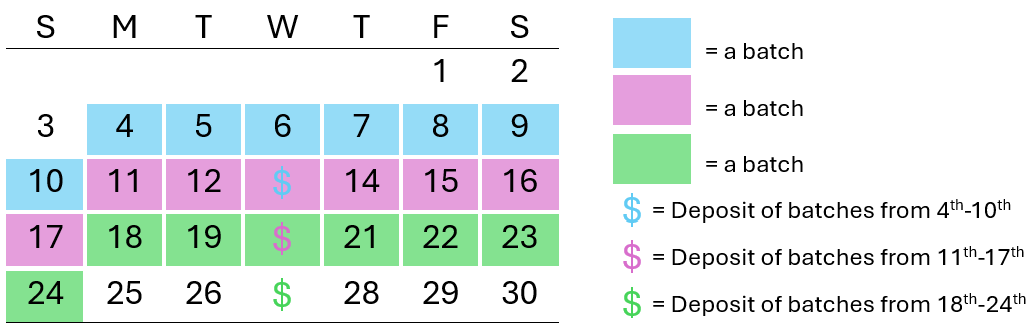
Refer to the **Bank Activity** section to see all credits (like deposits) and debits (like refunds or billing fees) applied to your account.
**Transaction fees are not deducted from your deposits.** This makes it easy to match the amounts in your deposit with your batch totals.